

The short answer: a sales order confirms what a customer has ordered and on what terms, and it is issued before you deliver. An invoice requests payment for what you actually delivered, and it is issued after. The sales order tells your warehouse what to do. The invoice tells your customer what to pay.
They are easy to confuse because both list the same products, quantities and prices, and in a small business the same person often creates both. But they do different jobs, they hit your accounts differently, and in Malaysia only one of them is reported to the tax authority. Mixing them up is what causes stock to move without ever being billed.
Key takeaways
- Sequence: quotation, purchase order, sales order, delivery, invoice, payment. The sales order opens the transaction and the invoice closes it.
- Accounting: a sales order is not a financial entry. The invoice is what recognises revenue and creates a receivable.
- You cannot use one as the other. A sales order is not a valid request for payment, and an invoice is not an instruction to your warehouse.
- In Malaysia, the invoice is now also a tax filing. Businesses inside the MyInvois scope must have invoices validated by the Inland Revenue Board of Malaysia (LHDN). Sales orders are never submitted.
- Corrections work differently. A sales order can be amended by agreement before fulfilment. An issued invoice is corrected with a credit note or debit note, never edited.
Sales order vs invoice at a glance
This is the whole comparison in one place. If you only read one section, read this one.
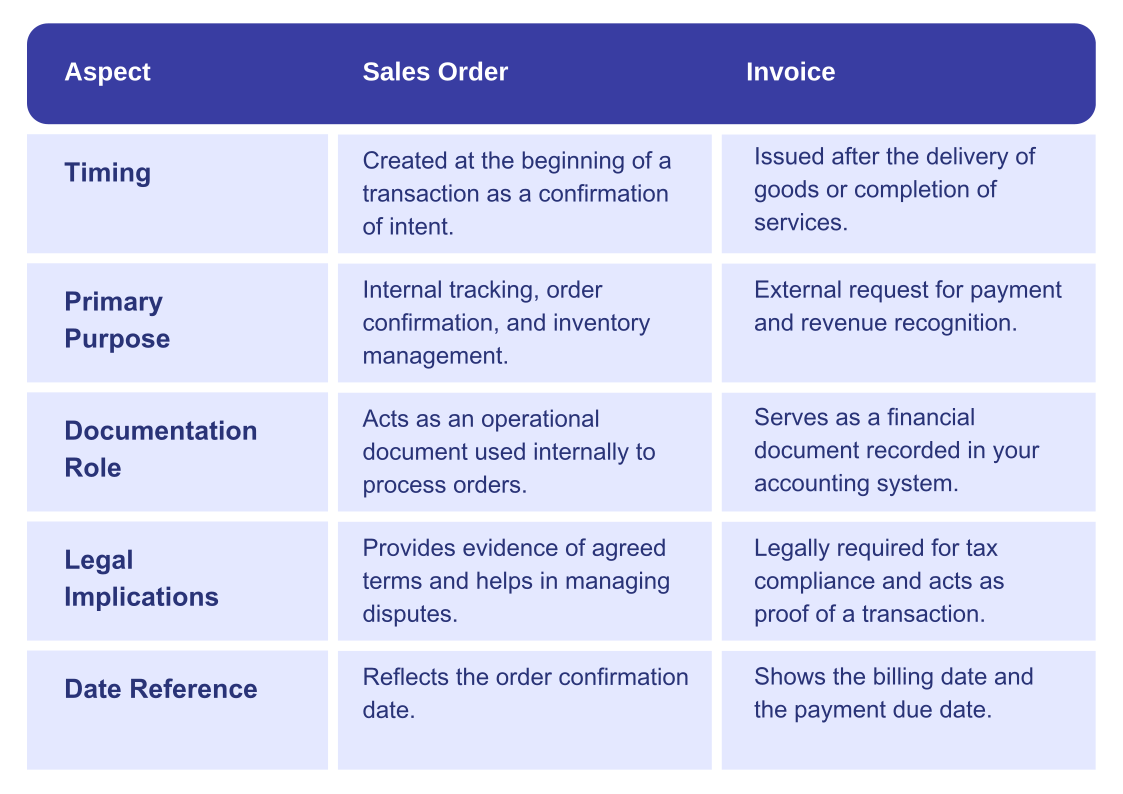
| Point of difference | Sales order | Invoice |
|---|---|---|
| Purpose | Confirms what was ordered and on what terms | Requests payment for what was delivered |
| Who issues it | The seller | The seller |
| What triggers it | The buyer's purchase order, or an accepted quotation | Completed delivery, or an agreed billing stage |
| Timing | Before fulfilment | After fulfilment |
| Main audience | Internal: warehouse, production, logistics | External: the customer's accounts payable team |
| What it controls | Stock allocation, picking, scheduling, delivery dates | Amount due, payment terms, due date |
| Accounting impact | None on its own. It is an operational document | Recognises revenue and creates an account receivable |
| Numbering | An internal reference, format is up to you | A unique sequential number, required for audit and tax |
| Tax reporting in Malaysia | Never submitted to LHDN | Submitted through MyInvois once your business is in scope |
| How to correct it | Amend by agreement, any time before fulfilment | Issue a credit note or debit note. Do not edit the original |
| Legal weight | Evidence of agreed terms between the parties | Evidence of a debt owed, and a statutory record |
| When it closes | When the goods ship or the service is delivered | When the payment clears |
The distinction that matters most in practice is the third-last row. A sales order is a commercial agreement between you and your customer, and you can change it by mutual consent. An invoice is a financial record, so once it is issued you correct it by raising another document rather than by overwriting it. Businesses that edit issued invoices end up with an audit trail that does not reconcile.
What is a sales order?
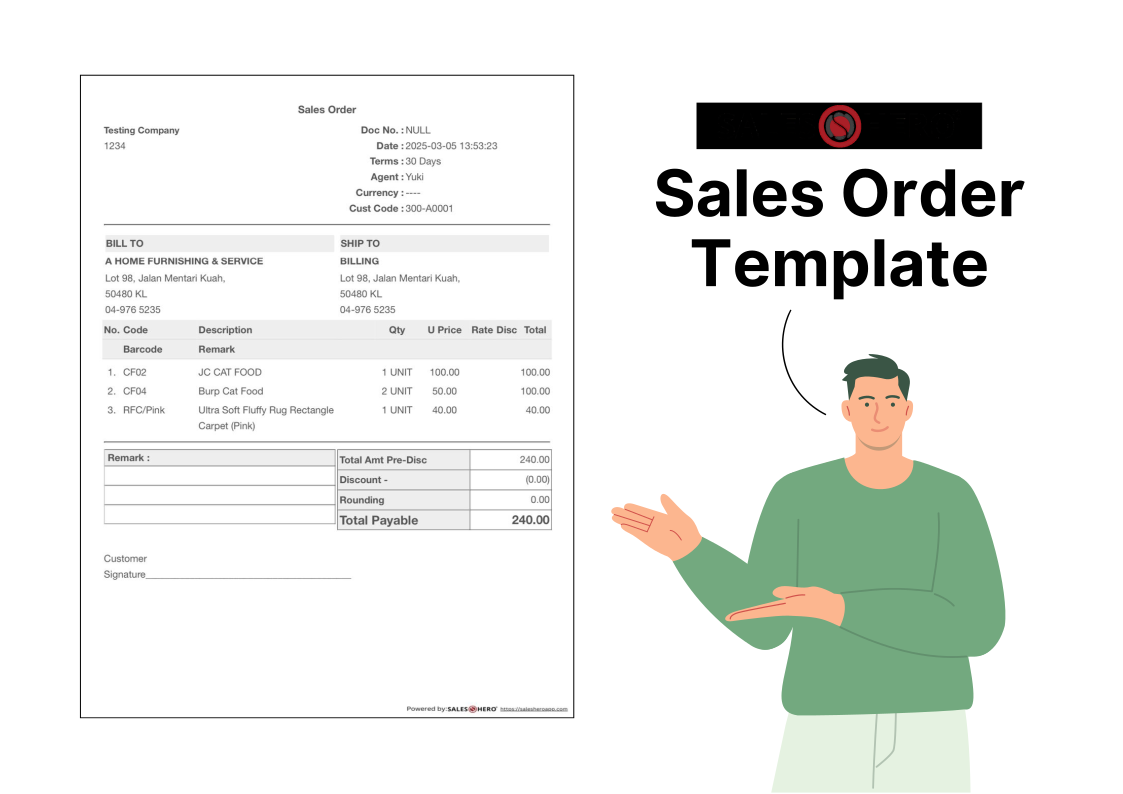
A sales order is the document a seller issues to confirm a customer's order and commit to fulfilling it on agreed terms. It is created after the customer decides to buy and before anything leaves your warehouse, and it is the instruction the rest of your business works from.
What a sales order is for
It does two jobs at once. Internally, it is a control document: it tells the warehouse what to allocate, production what to schedule, and logistics what to plan for. Externally, it is a confirmation: the customer can see that the quantities, prices and delivery dates you accepted match what they asked for, before either side has spent money on fulfilment.
What belongs on a sales order
- Seller and customer details, including the delivery address if it differs from the billing address.
- A sales order number and the date, so the document can be traced through to the delivery order and invoice.
- The customer's purchase order reference, if they issued one. Many buyers will not pay an invoice that does not quote it.
- Product descriptions, codes and specifications detailed enough that the warehouse picks the right item without asking.
- Quantities and agreed unit prices, including any discount already negotiated.
- Delivery dates and shipping terms, so expectations are set before the customer starts chasing.
- Payment terms, agreed here rather than argued about at invoice time.
Common types of sales order
- Standard order: the normal case. Goods are picked, delivered and invoiced on your usual terms.
- Cash sale: payment is taken at the point of order, so the sales order and invoice are effectively created together.
- Rush order: flagged for expedited handling, often with different shipping arrangements and costs.
- Scheduling agreement: one agreement covering a series of scheduled deliveries to a recurring customer.
- Third-party or drop-ship order: fulfilled by a supplier who ships directly to your customer, so the sales order carries the third-party arrangement as well.
Why sales orders matter more than they look
A sales order is the cheapest place to catch an error. Fixing a wrong quantity on a sales order costs a phone call. Fixing it after the goods have shipped costs a return, a credit note and a customer who trusts you slightly less. It is also the document that makes demand visible: tie your sales orders to stock levels and you can see what is committed rather than just what is on the shelf, which is the difference between planning and reacting.
It is worth being deliberate about the data captured here, because everything downstream inherits it. If you want a starting point, our free business document templates include sales order and invoice formats you can adapt.
What is an invoice?
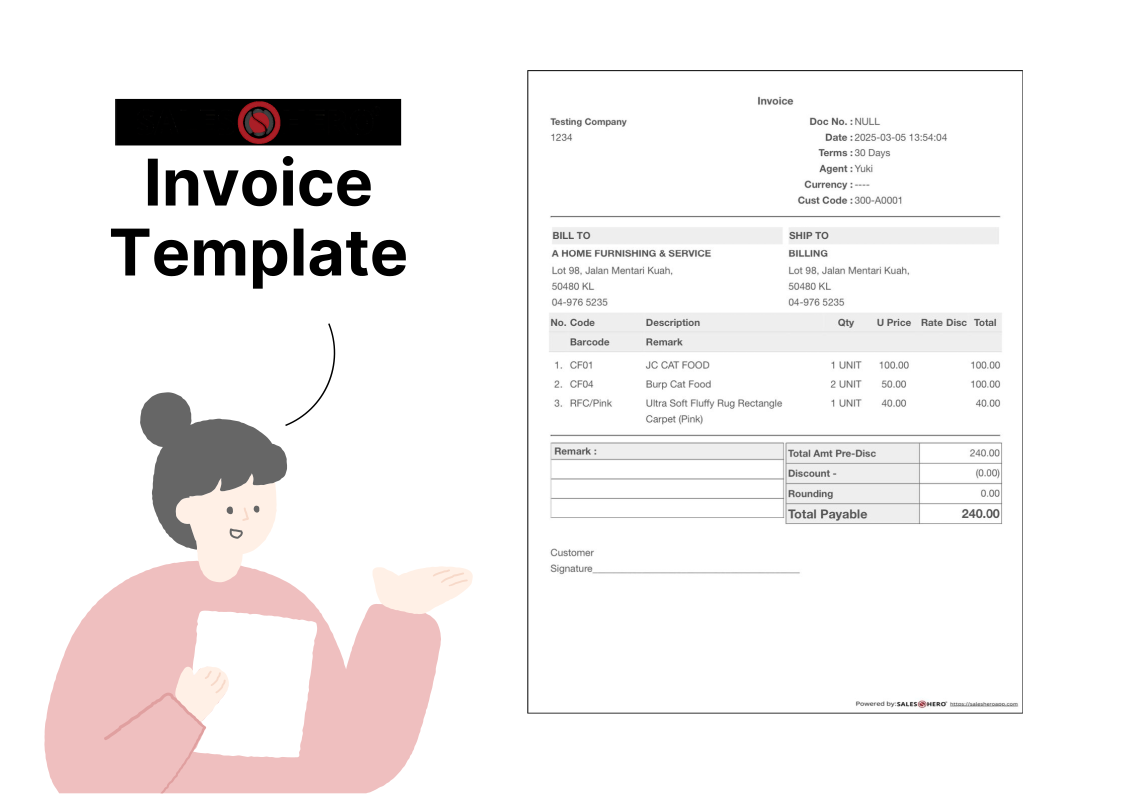
An invoice is a formal request for payment issued after goods or services have been delivered. It states what was supplied, how much is owed, when it is due and how to pay. Unlike a sales order, it is a financial document: the moment it is issued, it affects your books.
What an invoice is for
Its obvious job is getting paid. Its less obvious job is being the record that your revenue, your tax position and your audit trail all rest on. An invoice is the point at which a sale stops being an operational event and becomes a financial one, which is why the rules around it are stricter than the rules around a sales order.
What belongs on an invoice
- A unique, sequential invoice number. Not optional. Gaps and duplicates are the first thing an auditor looks for.
- Issue date and payment due date, stated separately. "30 days" with no issue date is not a due date.
- Full seller and buyer details, including registration numbers where required.
- Itemised lines matching what was actually delivered, not what was originally ordered.
- Tax treatment, shown line by line where applicable.
- The total amount due, prominently, with the currency stated.
- Payment terms and methods, including bank details, early settlement discounts and any late payment charge.
- References back to the sales order, delivery order and customer purchase order.
Common types of invoice
- Proforma invoice: not a real invoice. It is a quotation in invoice format, used so a buyer can arrange payment or import paperwork before goods ship. It does not create a receivable.
- Interim or progress invoice: bills part of a longer job so cash keeps moving before completion.
- Final invoice: the real payment request once delivery is complete.
- Credit note: reduces or reverses a previously issued invoice, for returns, shortfalls or pricing corrections.
- Debit note: increases the amount owed, for example where an undercharge is found after issue.
The proforma invoice is the one that causes the most confusion. Because it looks like an invoice, businesses sometimes book it as revenue. It is closer to a quotation than to an invoice, and it should never enter your sales ledger.
How they work together: the order-to-cash flow
Neither document makes sense on its own. This is the full sequence in a typical business-to-business sale, and where each document fits.
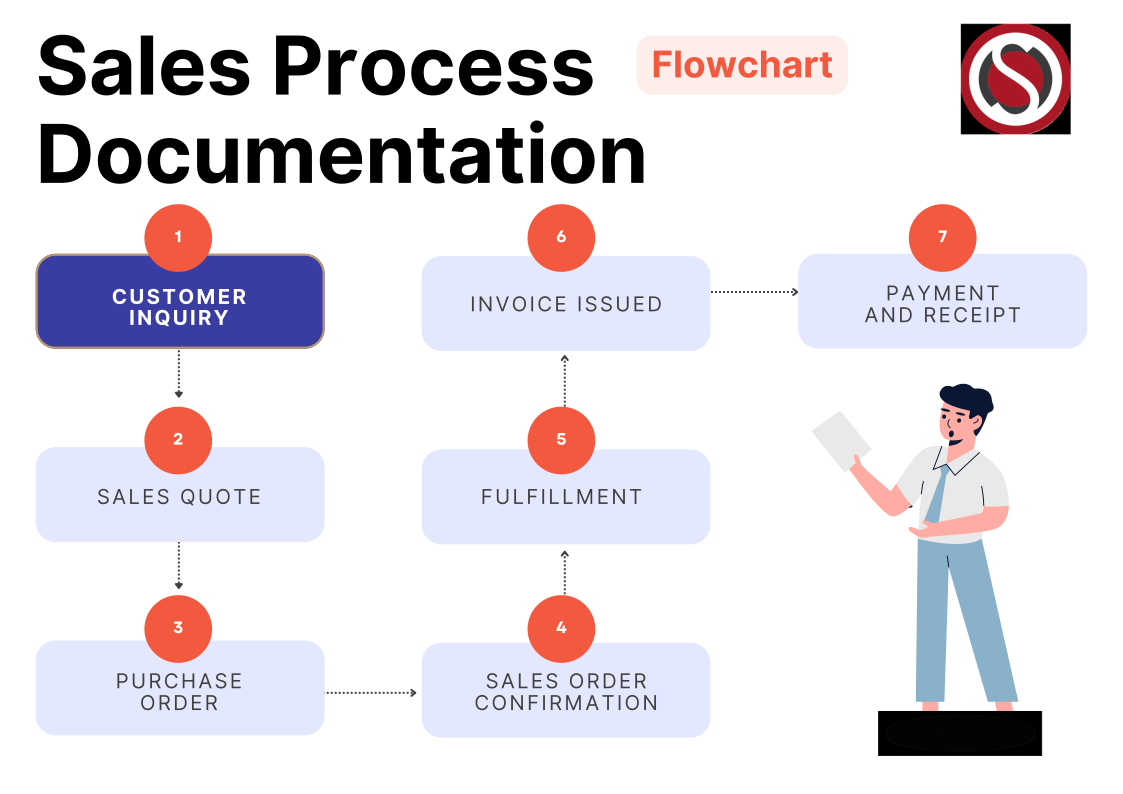
- Enquiry. The customer asks what you can supply and at what price.
- Quotation. You respond with prices and terms. Non-binding, and usually valid for a stated period.
- Purchase order. The customer issues a purchase order to commit to buying. This comes from them, not you.
- Sales order. You accept and confirm the details. From here your warehouse can act.
- Fulfilment and delivery order. Goods are picked, packed and shipped with a delivery order that records what physically left. The customer signs for it, and that signature is your proof of delivery.
- Invoice. You bill for what was actually delivered, referencing the sales order and delivery order.
- Payment and receipt. The customer pays, you issue a receipt, and the transaction closes.
Step 5 is the one most often skipped in smaller operations, and it is the one that decides disputes. If a customer claims they received eight cartons rather than ten, the signed delivery order is the only document that settles it. The sales order proves what was agreed; the delivery order proves what arrived; the invoice bills the overlap.
What Malaysia's e-Invoice rules change, and what they do not
This is the part that has changed most since this guide was first written, and it is the clearest practical difference between the two documents for any Malaysian business.
Important: under Malaysia's MyInvois system, the invoice is no longer only a document you send to your customer. Once your business is in scope, it is also a submission to the Inland Revenue Board of Malaysia (LHDN) that must be validated before it counts as a valid tax invoice. The sales order is not part of that at all and is never submitted.
Who is in scope right now
The rollout has been phased by annual turnover. In September 2026 the government raised the exemption threshold from RM1 million to RM3 million in annual revenue, effective 1 September 2026, which took a large number of smaller businesses back out of the mandatory scope for now. Businesses below the line can still register voluntarily, and many do because their larger customers ask for it.
Thresholds and phase dates have moved more than once, so confirm your own position rather than relying on a figure in any article, including this one. We cover the current position in detail in how to check your e-invoice exemption status under the RM3 million threshold, and you can run a quick check with our Malaysia e-Invoice compliance checker.
How this changes the order-to-cash flow
For a business inside the scope, one step is inserted into the sequence above. Between issuing the invoice and the customer paying it, the invoice goes to LHDN for validation and comes back with a unique identifier and a QR code. Only then is it a valid tax invoice. In practice that means:
- Invoice data has to be right the first time. A rejected submission is a delayed invoice, and a delayed invoice is delayed cash.
- Buyer tax details must be captured at order time, not invoice time. Chasing a customer for their tax identification number while the invoice sits unvalidated is the most common avoidable delay.
- Corrections are time-bound. Cancelling or correcting a validated e-invoice has to happen inside a fixed window, after which you need a credit note instead.
The useful consequence for this comparison: your sales order is now where e-invoice quality is won or lost. Every field the tax authority requires on the invoice has to come from somewhere, and the cleanest place to capture it is at the point the order is confirmed. Businesses that treat the sales order as a rough internal note end up rekeying customer data at invoice time, which is exactly where the errors come from.
If you have already submitted e-invoices with mistakes in them, there is a correction route: see our guide to the e-Invoice Voluntary Disclosure Programme. For a broader briefing on what wholesalers need to have in place, read Malaysia e-Invoice 2026: what wholesale businesses need to know.
Sales order vs purchase order vs delivery order vs invoice
Sales order and invoice are the two most often confused, but they sit in a set of six documents that all describe the same transaction from different angles. Knowing which is which removes most of the confusion at once.
| Document | Created by | When | The question it answers |
|---|---|---|---|
| Quotation | Seller | Before the order | What would this cost? |
| Purchase order | Buyer | To place the order | We want to buy this |
| Sales order | Seller | To confirm the order | We accept, and this is what we will ship |
| Delivery order | Seller | With the goods | This is what was actually delivered |
| Invoice | Seller | After delivery | This is what you owe, and by when |
| Receipt | Seller | After payment | We have received your payment |
The two pairs worth separating clearly:
- Purchase order vs sales order. Same transaction, opposite sides of the table. The buyer raises the purchase order; the seller answers with a sales order. If you are the seller, an incoming document titled "purchase order" is your customer ordering from you, and it is not something you create. If you also buy stock, you will raise your own purchase orders to suppliers, which is where our AI purchase order system fits.
- Delivery order vs invoice. The delivery order travels with the goods and records quantities, not money. The invoice follows and records money. Keeping them separate is what lets you bill accurately on a partial delivery: you invoice what the signed delivery order says arrived, not what the sales order originally promised.
Why you need both documents
It is tempting in a small operation to skip the sales order and go straight to an invoice. That works until it does not, and the failure is always the same: something ships that nobody agreed to, or something is agreed that nobody ships.
What the sales order gives you
- An accurate picking instruction, so the warehouse is not working from an email thread.
- Visible committed stock, so you can tell the difference between what you have and what is already promised.
- Evidence of the agreed terms if the customer later remembers a different price or date.
- A clean data source for the invoice, which matters more than ever under e-invoicing.
What the invoice gives you
- The legal basis to be paid, and a document your customer's accounts payable team can process.
- Revenue recognition and an accurate receivables ledger, so you know what you are owed and how overdue it is.
- Tax compliance, including the MyInvois submission where applicable.
- An audit trail that reconciles to the delivery order and the sales order.
Together they close the loop. The sales order says what should happen, the delivery order says what did happen, and the invoice bills for it. Once those three reconcile automatically, most of the argument goes out of your order-to-cash process. If you want to measure whether it is working, our guide to the 19 sales KPIs to track for B2B success covers the metrics that expose a leaky cycle, and using sales and accounting data together shows how to read them side by side.
Six mistakes that cost real money
These are the ones we see most often in wholesale and distribution businesses.
1. Sending a sales order and expecting payment
A sales order is not a request for payment and most accounts payable teams will reject it. The invoice is what enters their payment run. Sending the wrong document typically costs a full payment cycle.
2. Editing an issued invoice
Once an invoice is issued it is part of your financial record. Corrections go on a credit note or debit note. Overwriting the original breaks the sequence and is one of the fastest ways to fail an audit.
3. Non-sequential or duplicated invoice numbers
Gaps and duplicates in invoice numbering are treated as a red flag. If several people can raise invoices, the numbering has to be generated by the system, not typed in.
4. Skipping the delivery order
Without a signed delivery order you have no proof of what arrived. In a shortfall dispute the customer's count wins by default, because you cannot evidence yours.
5. Invoicing the sales order instead of the delivery
When a delivery is short or partial and the invoice is generated from the original sales order, you bill for goods the customer never received. That is a credit note, a delayed payment and an awkward phone call.
6. Collecting customer tax details at invoice time
Under e-invoicing, missing buyer details stop an invoice from validating. Capture them when the customer account is created or the order is confirmed, so the invoice has everything it needs the moment delivery completes.
Automating sales orders and invoices
Most of the mistakes above are not knowledge problems. They happen because the sales order lives in a notebook, the invoice lives in a spreadsheet, and a person retypes the data between them. Every retype is a chance to introduce an error, and under e-invoicing an error now has a compliance cost as well as a commercial one.
The fix is to make one document generate the next. When a sales order converts into a delivery order and then an invoice, the data carries forward instead of being re-entered, and the three documents reconcile by construction.
- Fewer errors. Data is captured once, at the point of order, and reused.
- Faster order to cash. Invoices go out the day delivery completes rather than at the end of the week.
- Accurate partial billing. The invoice is generated from what was actually delivered.
- Cleaner e-invoice submissions, because the required fields were collected upstream.
- Visibility. You can see which orders are unshipped, which deliveries are uninvoiced and which invoices are overdue, without building a report by hand.
That is the workflow our own tools are built around: orders captured on a mobile sales app or through customer self-ordering, stock movements handled in StoreHero WMS, and the financial side reconciling into SQL accounting software. You can see the full document flow in SalesHero features and modules.
Final thoughts
The difference between a sales order and an invoice is simple to state: one confirms the order, the other collects the money. What makes it worth getting right is everything hanging off that distinction. The sales order governs your operations and your stock. The invoice governs your revenue, your cash flow and, in Malaysia, your tax filing.
If you take one action after reading this, make it this one: check that your invoices are generated from your delivery records rather than retyped from your sales orders. That single change removes the most expensive error in the cycle, billing for goods that never arrived, and it is also what makes your e-invoice submissions validate first time.
If you would like to see how that works end to end on your own order volumes, talk to our team.

Frequently asked questions
Which comes first, the sales order or the invoice?
The sales order comes first. It is created when you accept the customer's order, before anything is delivered. The invoice comes after delivery and requests payment for what was supplied. In a cash sale the two happen within minutes of each other, but the order is still the same.
Is a sales order a legally binding contract?
A sales order is strong evidence of the terms both parties agreed, and once the customer has accepted it, it generally forms part of a binding agreement. Whether it is binding on its own depends on the wording, your standard terms of sale and the surrounding correspondence, so treat it as evidence of a contract rather than assuming it is the contract. If a specific order matters commercially, have your terms reviewed by a lawyer.
Can I use a sales order as an invoice?
No. A sales order is not a valid request for payment and most accounts payable teams will reject it. It also lacks things an invoice needs, such as a unique sequential invoice number and a payment due date. In Malaysia, a sales order cannot be submitted through MyInvois, so it can never serve as a valid tax invoice.
What is the difference between a purchase order and a sales order?
They describe the same transaction from opposite sides. The buyer raises a purchase order to commit to buying. The seller responds with a sales order to confirm acceptance and the exact terms of supply. If you receive a purchase order, you are the seller and your next document is a sales order.
What is the difference between a sales order and a delivery order?
A sales order records what was agreed before fulfilment. A delivery order records what physically left your warehouse and travels with the goods for the customer to sign. The sales order deals in commitments, the delivery order deals in facts, and where they differ, you should invoice from the delivery order.
Is an invoice legally required in Malaysia?
In most commercial situations, yes. Malaysia replaced GST with the Sales and Service Tax (SST) in 2018, and SST-registered businesses must issue tax invoices for taxable supplies. Separately, businesses inside the MyInvois scope must have their invoices validated by LHDN before they count as valid tax invoices. Because the thresholds have changed more than once, confirm your own obligations with LHDN or your tax agent rather than relying on a general guide.
Do sales orders need to be submitted to LHDN under e-Invoice?
No. MyInvois covers invoices, credit notes, debit notes and refund notes. Sales orders, quotations and delivery orders are internal commercial documents and are not submitted. They still matter, though, because the data your invoice is built from usually originates on the sales order.
What if I need to change an invoice after issuing it?
Do not edit it. Issue a credit note to reduce or cancel the amount, or a debit note to increase it, and reference the original invoice number. This keeps your numbering sequence intact and leaves an audit trail showing what changed and why. Under e-invoicing there is also a short window in which a validated invoice can be cancelled outright, after which a credit note is the only route.